100–120 fps
Nearly the screen's full rate
CS2 on Dust II, MacBook Pro with M3 Pro, D3DMetal — without lowering settings or resolution. The top 120 is a cap in the game's config, not the limit of the Mac.
A friend invited you — the invitation is remembered. It counts for them once you install Uncork.
You already have an invitation — the first one you followed is the one that counts.
The invitation link didn't work: no such code. Ask your friend to send the whole link again.
Apple Silicon · macOS 14+ · three days free
Uncork installs Steam and starts your game — and fixes what makes gaming on a Mac feel off: the mouse is read straight from the device, frames reach the screen evenly, and macOS turns on Game Mode for the game.
Your Steam password and Steam Guard code are never asked for.
WHAT YOU GET
100–120 fps
CS2 on Dust II, MacBook Pro with M3 Pro, D3DMetal — without lowering settings or resolution. The top 120 is a cap in the game's config, not the limit of the Mac.
up to 1000 Hz
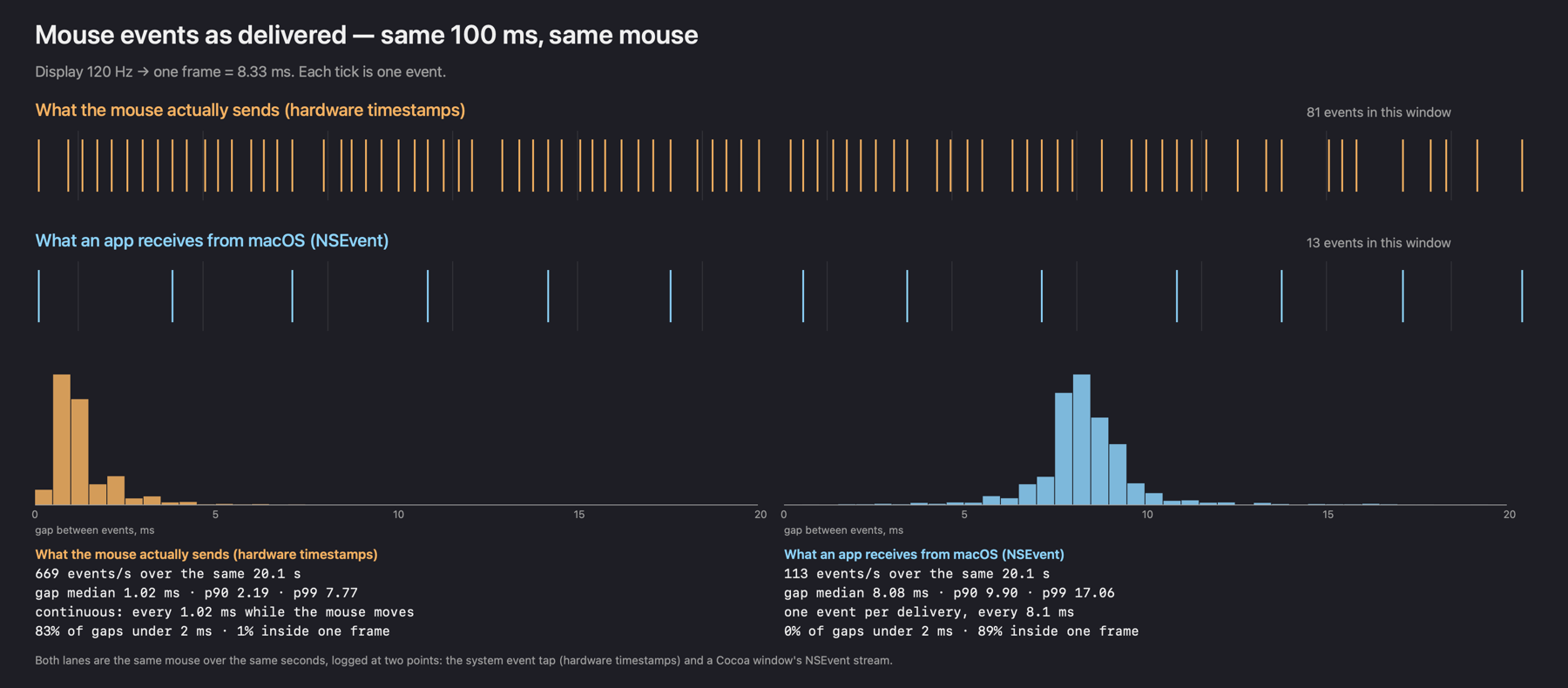
macOS hands mouse movement over in batches, once per display frame. Uncork reads the mouse straight from the device, at its own rate.
87%
Frames reach the screen at even intervals. CS2 at 80 fps: 87% of frames even, versus 18% without it.
Game Mode
macOS gives the game the CPU and GPU and polls controllers and headphones more often — just as it does for App Store games.
DualSense
A DualSense or Xbox controller drives the Mac's pointer: pick a game and start it without getting off the couch.
24 h
That long you can play offline. After that, go online once — and you get another day.
measured on a MacBook Pro 14″ with M3 Pro; the polling rate depends on the mouse itself · how it works ↓
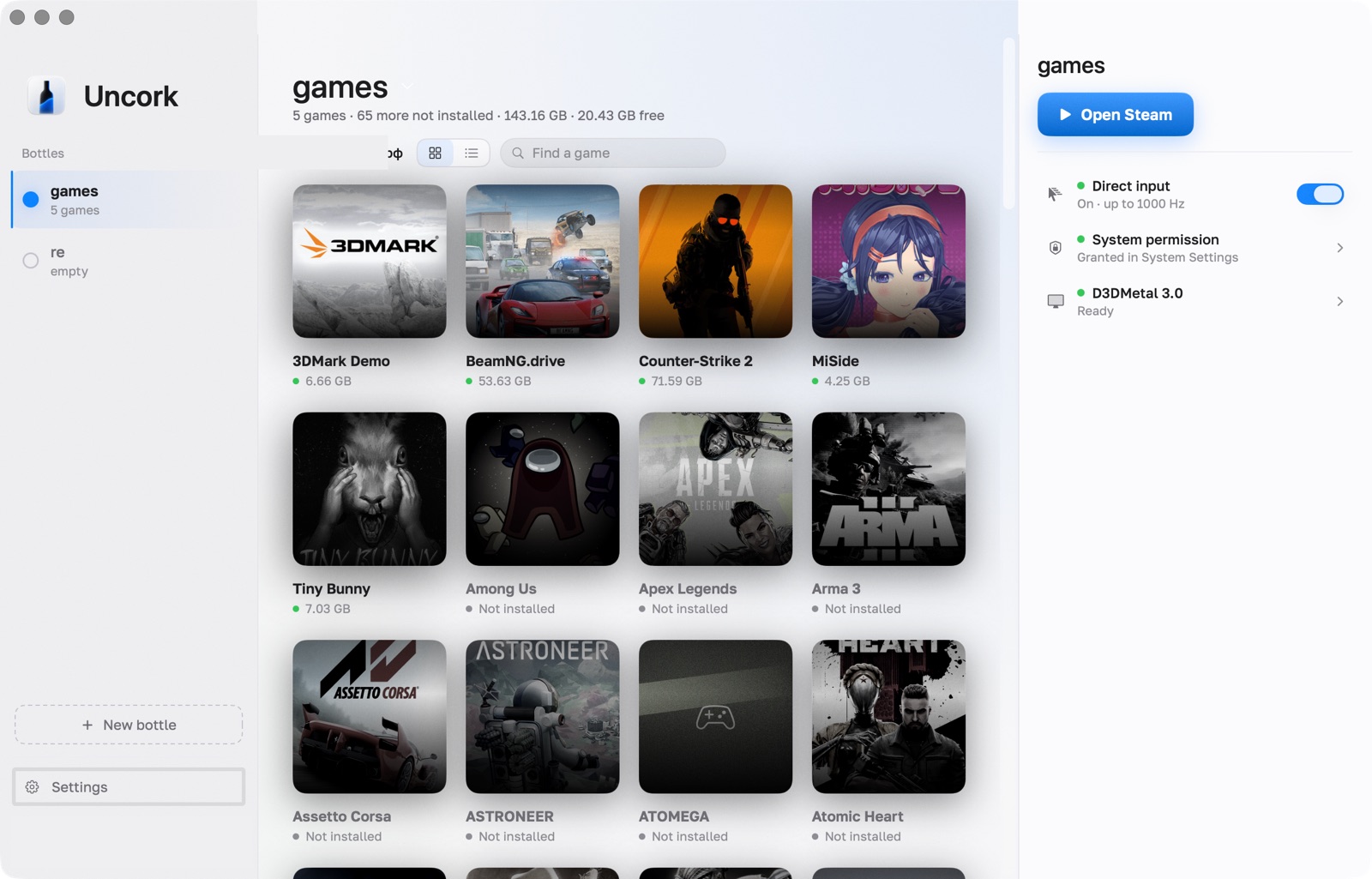
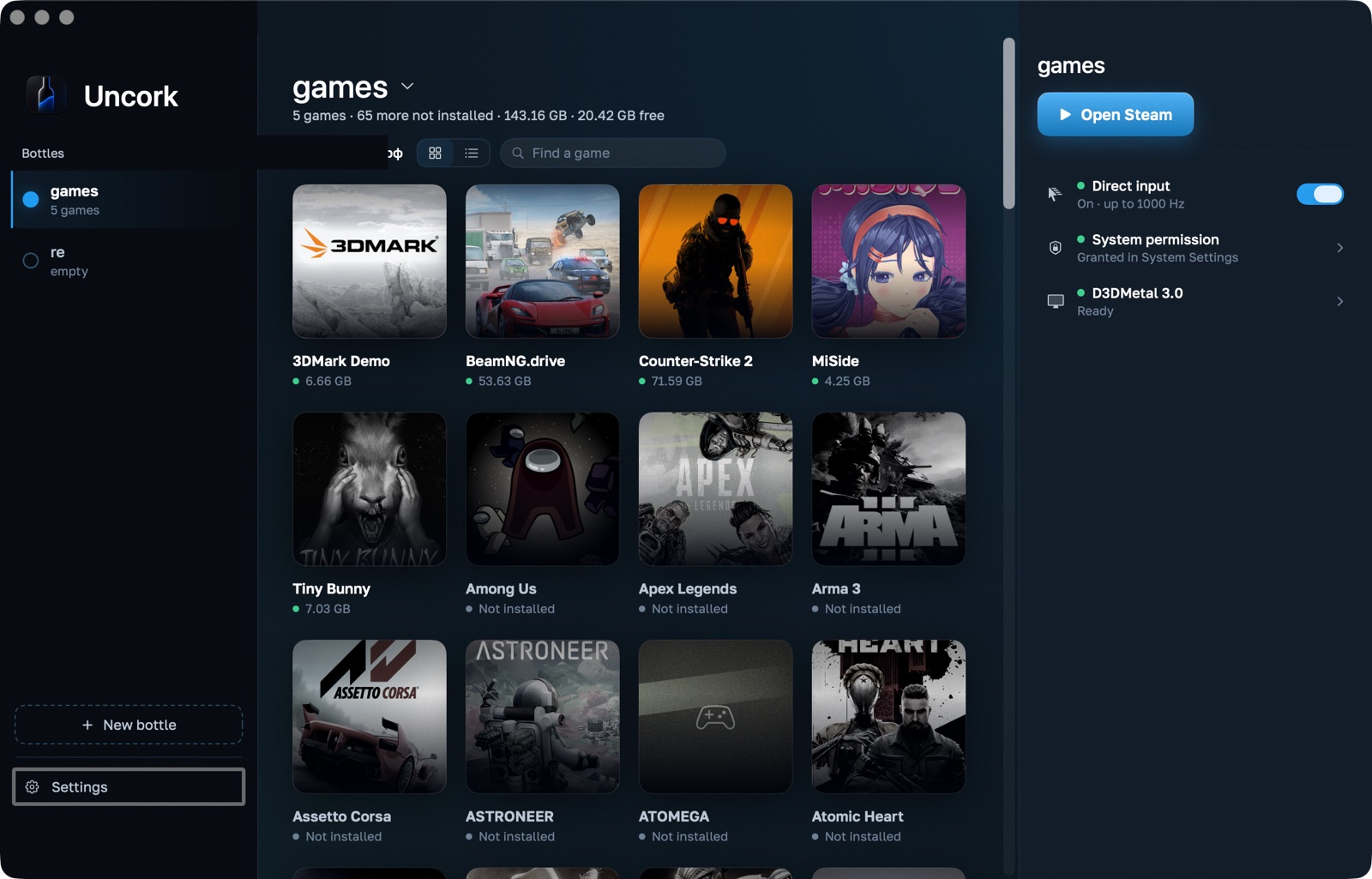
Below is a live demo of the interface on this page: the windows really open. The library and the dates in it are an example, not your account.
5 games · 64 more not installed · 141.64 GB · 43.12 GB free
DXMT re-points the bottle's engine at a separate runtime clone, so it can only be changed with Steam closed.
synchronisation through Mach semaphores
a fallback when the build has no MSync
one per line, KEY=VALUE
The check covers the data of the Steam account signed in right now; run it again after switching accounts.
winecfg changes engine settings, regedit the Windows registry. Use them only by a specific instruction: wrong changes can break this bottle.
Everything needed to make Windows games run on this Mac. Whatever is missing, Uncork downloads and installs on its own — no Terminal.
Apple Silicon · macOS 26.0 · Rosetta 2 in placeApple Silicon: M3 Pro macOS: 26.0 Rosetta 2: installed Free disk: 43.12 GB
249 MB · this is where D3DMetal comes from. They download themselvesModern Steam needs engine version 10 or newerd3d11 · dxgi → libd3dshared · without this games do not startNothing found. Try another name.
This bottle is empty — Steam has not been installed here yet.
Your nickname · free · access until 12 Oct 2026
The driver key is good for another 10 h (until 12.10 09:41).
This computer: 0f3c9a21b7d4The code stays bound to this computer and will not work on another Mac. Changing machines? Write to us and we will release it.
Installed 0.15.0 — the newest version known.
engine-10.0 (Sikarugir)3.0 · wiredModern Steam needs engine version 10 or newer. GPTK is the source of the graphics libraries; engine 7.7 and the CEF fix do not remove transport error 0x3014.
MacBook Pro Speakers · 512 frames · 10.7 ms buffer · 48000 HzIf SDL games rasp, try Compatible sound · DirectSound in the bottle settings, then restart Steam. The device figures above do not measure the game’s latency.
The theme changes at once. Match system takes the dark blue one in macOS dark mode and the light one in light mode.
~/Library/Application Support/winebottle/Bottles~/Library/Application Support/winebottle/Runtimes~/Library/Application Support/winebottle/CacheMoving copies the whole store into the chosen folder and verifies the copy. The original folder stays; absolute user paths may need updating by hand.
The cache holds the downloaded SteamSetup.exe and the engine archive. They can be deleted: the next install downloads them again. WINEBOTTLE_HOME moves all of this to another root, an external disk for instance.
a preview of a safe report; no accounts, secrets or raw logsfonts, libraries and the driver: licence texts and how to get the sourcesInstall a compatible engine, wire D3DMetal and run the D3D11 check. A green mark on one check does not guarantee that every game is compatible.
Install the game in Steam, wait for the download to finish and launch it from the library. If a launch is not confirmed, open the log or the history and try again.
Close Steam and your games before a repair, a runtime rollback or a profile restore. A report first shows a safe preview and is never sent automatically.
csgo-2026-09-21.log14 linesFolder name: latin letters, digits, hyphen. For example: games
racingNothing selected means an empty bottle: you can install a program into it from a file.
Save a baseline first. Compare one scene, 120 seconds, at least three warmed-up runs. Change one parameter at a time; old logs do not prove a gain in frames.
2026-09-11 21:01:30Avg 107,5 · P1 72,9P99 13,71 ms−2752026-09-11 21:06:18Avg 110,2 · P1 70,9P99 14,10 ms−8922026-09-11 21:10:54Avg 89,5 · P1 51,9P99 19,27 ms−53352026-09-11 21:32:11Avg 117,6 · P1 85,0P99 11,77 ms−39242VProf's P1 is not the average of the worst 1%. There are no measurements here of mouse latency, GPU time or frames >25/50 ms: the VProf summary does not carry them.
21:01:30⌄B21:32:11⌄Conditions were not recorded or do not match — the performance comparison is not confirmed.
Importing does not launch the game and does not invent results.
The rows are real: four VProf reports from console.log on the evening of 11 September 2026, MacBook Pro with an M3 Pro.
21 Sept, 22:141 h 48 min session
21 Sept, 21:5720 Sept, 19:0320 Sept, 18:5819 Sept, 22:40the engine found no d3d11 — switch D3DMetal on in the bottle settings
Meow.
The disk is empty. The cat, however, is in.
Prerelease · beta
A small Mac app: Steam in its own bottle, D3DMetal or DXMT for graphics, and a mouse read straight from the device.
Every menu, theme and button here works. The window closes with the red circle and opens again by double-clicking the icon on the desktop.
Uncork neither emulates Windows nor virtualises it. It translates Windows calls into macOS calls and turns DirectX into Metal. The game believes it is on Windows.
Its own folder with its own C: drive, registry and settings. The store and your games install into it rather than into your system, and they go away entirely when the bottle does. It is not a sandbox: the Z: drive inside points at the root of your Mac — that is how the compatibility layer itself works — so a game reaches files exactly as far as macOS lets Uncork reach them. You can keep several bottles, one for a heavy game, for instance.
Uncork installs the Windows build of Steam and fixes what usually breaks in it on a Mac. The Epic Games Launcher is supported too — the library shows games from both stores together. You sign in inside the store itself, install what you bought, and see it in the Uncork library.
Play starts the game with D3DMetal or DXMT. Uncork watches the processes, keeps a log, and stops the screen from dimming while you are in a match.
Most of what makes games on a Mac feel wrong lives in the compatibility layer's own macOS driver, not in the launcher. So Uncork builds that driver itself and installs it into the runtime.
macOS delivers mouse events in bursts, once per display frame. Fine for a desktop; in a shooter your aim stutters, because about eight movements arrive as one lump. Our driver reads the device's own HID reports at the device's own rate. In CS2 you feel it immediately — this is the thing the whole project started for.
needs the Input Monitoring permission; without it the driver behaves like the stock one
An average fps says nothing about smoothness: CS2 at 118 fps shows gaps between frames on screen that jump from 4 to 13 ms, and the picture jerks. Even frames starts every frame on an even grid matched to the display's steps — 120, 80, 60 — and releases each finished frame at the same point, so it reaches the screen at equal intervals. Auto watches how frames actually hit the screen and holds them only when that makes them more even.
CS2 at 80: 87% of intervals within 1 ms of the mean, versus 18% without it; latency to the screen did not grow — 19 ms versus 21
CS2 takes macOS key auto-repeat badly: stand still, hold a key, and the image trembles. Uncork switches repeat off while the cursor is hidden — that is, in the game — and switches it back on when the cursor returns, so chat and console type normally.
Apple’s D3DMetal lets the CPU run ahead of the GPU, and that turns into mouse lag. DXMT keeps the frame queue short, and the aim feels steadier on it. What that costs in frames we honestly do not know: we never ran a matched comparison on one scene, and an impression from ordinary play is not a measurement. Which matters more is your call: one click in the bottle settings, separately for each bottle.
The driver can log how many frames are actually queued up and how many milliseconds a mouse movement waits to be handled. So "it got better" here is a number, not a feeling — and when an idea did not work, the numbers said so and we dropped it.
Connect a DualSense, DualShock 4 or Xbox controller and a badge with its battery level pops up in the corner of the window. The touchpad moves the pointer like a laptop trackpad, two fingers scroll, ✕ clicks, ○ is Esc, the d-pad sends arrow keys, L1 and R1 switch tabs. Pick a game and launch it without getting up. While a game runs, the mode stays quiet: the controller belongs to the game.
needs the Accessibility permission; over Bluetooth the DualSense touchpad reports the finger every ~15 ms — Uncork smooths the steps to the display refresh
macOS gives a game CPU and GPU priority and polls wireless controllers and headphones twice as often — but only if it recognises the process as a game. A Windows game is just an anonymous program to it. Uncork launches every game from its own tiny app in the Games category, and macOS then turns Game Mode on by itself when the game is full screen and in front. No Xcode, no Terminal switches.
switchable in the bottle settings; while Game Mode is on, macOS itself shows its icon in the menu bar
This is a narrow tool, not a universal compatibility layer. The list is short, but every line was checked by hand rather than collected from other people's reports.
Every number on this page was measured on a MacBook Pro with an M3 Pro (14-core GPU, 18 GB) and describes that machine.
The full CS2 report: measurements, the mouse, and what does not work → The full BeamNG.drive report →
Other games will probably start too: the compatibility layer handles a lot. But we will only promise what we have checked.
The choice is remembered. Dark and AMOLED for the evening, neon for anyone used to deep-blue game interfaces.
M1 and newer. Uncork does not run on Intel Macs.
We test on the current one; older versions are untested.
Uncork downloads the graphics libraries itself — about 250 MB, once, with a checksum check. No Terminal needed.
The runtime and Steam come to about 3 GB: 1.1 for the engine and 1.7 for a bottle with Steam in it, measured here. After that it is whatever the games weigh. CS2 needs 85 GB, and better with room to spare: its updates ask for more on top. The app shows you the free space before anything is installed.
Tools inside the bottle ask for it, and until it is there the app will not let you create a bottle — the checks screen says so. The same screen has a button that installs it: Apple's own command, no terminal. On Macs that have run anything Intel-built, it is usually already there.
You buy the games yourself. Uncork downloads nothing outside Steam.
A compatibility layer costs frames. Uncork will not turn a laptop into a gaming PC, and we will not draw charts where it performs "like native".
What we do instead: remove the things that ruin how a game feels — a stuttering aim, mouse lag, a trembling picture. Sometimes that matters more than ten frames.
straight talk
A small private project. We play on this ourselves — that is why fixes are quick, and why we do not promise what we have not checked.
Write to us on Telegram ↗Signed with a development certificate, not notarized by Apple. So macOS will not open it the first time: you allow it in System Settings, under Privacy & Security. Things can break; we fix them quickly, because we play on this ourselves.
Never. Neither the password nor the Steam Guard code: you type them into Steam itself, as on any computer. Uncork does not see them, store them or send them anywhere.
We do not defeat anti-cheat and we do not fetch games outside Steam. Nobody can guarantee your account will never be flagged — decide for yourself what you are risking.
The log opens with a button: every command Uncork runs on your machine is in it. Next to it the environment check tells you what is installed, what is missing and what exactly is broken, instead of just saying error.
The driver runs on a key the app fetches from the site and renews on its own. The key lasts a day: a flight or a weekend at the cottage is fine, a week is not.
You sign in with Google or with a code sent to your email, so we do have your address and your name; your password we never see. We do not ask for a phone number. The computer is recognised by an irreversible fingerprint that cannot be turned back into the machine or into you.
Set up an account and your access code appears in your profile straight away. Your trial days begin when the app first runs on your Mac. Nobody to ask, nobody to wait for.
With Google or a code by email — no password to set up. Your profile will have a code like UNCK-XXXX-XXXX-XXXX and a download link.
Download the image — then there are two ways. Your profile carries a ready-made line for Terminal: it checks the image against the build’s checksum and, if the bytes match, opens it with no warnings at all. By mouse it takes longer: drag Uncork to Applications, macOS will not open it the first time — press Done, then System Settings → Privacy & Security → scroll to Security → Open Anyway. A second identical dialog appears — press Open Anyway there too, then confirm with Touch ID or an administrator password. Never press Move to Trash: that deletes the app. Warnings only ever concern the app itself — Uncork downloads the engine and the graphics libraries on its own.
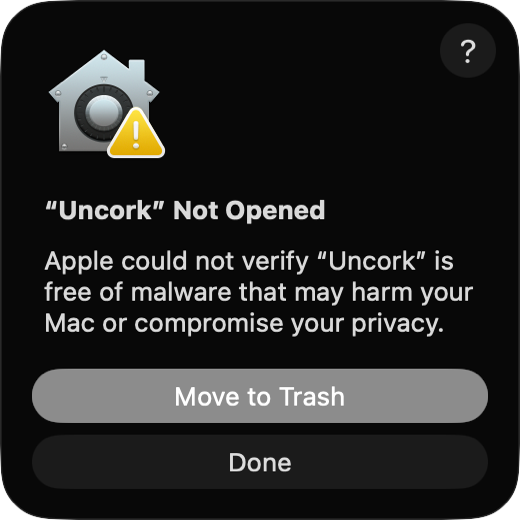 01Press Done — not Move to Trash
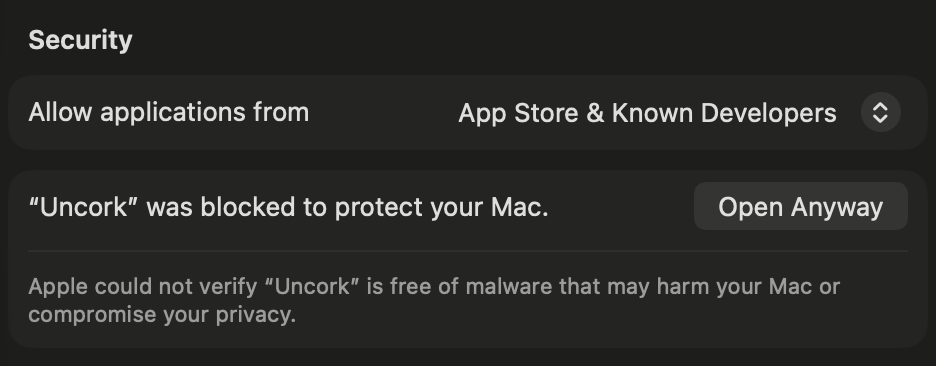 02Settings → Security → Open Anyway
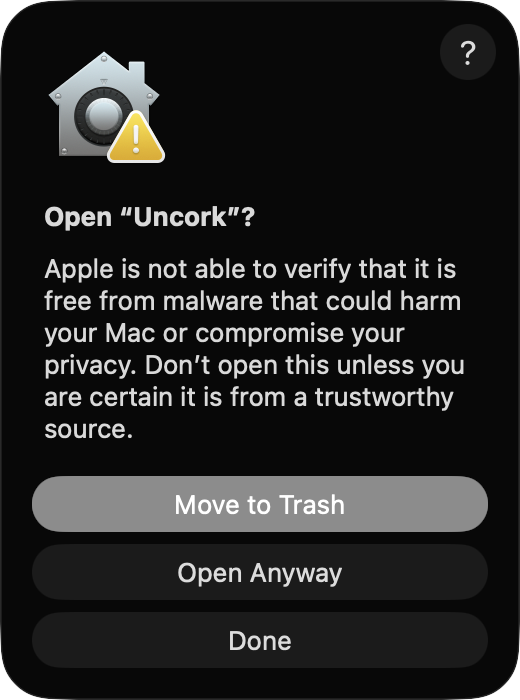 03Second dialog — Open Anyway again
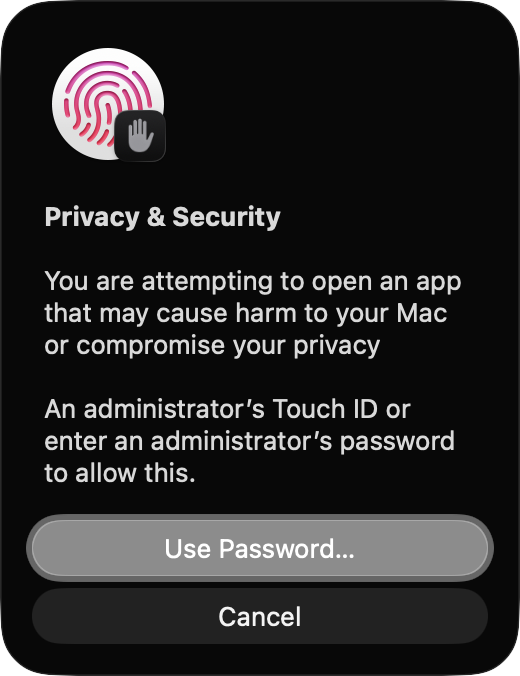 04Touch ID or an administrator password
The Sign in button opens your browser, you confirm, and this Mac gets access. A code like UNCK-XXXX-XXXX-XXXX is still there for machines where a browser is not an option. One access, one Mac. Changing machines? The button in your profile files a request and we unbind it by hand.
New versions are found and installed without you, with the build's signature checked first.
An account takes a minute, and trial days let you try before paying anything.
5 € a month or 50 € a year. The first three days are free, counted from the first launch on your Mac. Pay in your profile once you decide to stay.
Sign in and get your code Something wrong? Write to us on TelegramWe do not try to run everything. The list of games is short, but we patch the compatibility layer itself and fix what usually gets left alone: mouse input, key repeat, the frame queue. The work is about how a game feels, not about compatibility in general.
Yes, your own. Uncork installs the Windows build of Steam, you sign in yourself and install what you own. The password and Steam Guard code are typed into Steam's own window; Uncork never asks for them. Separately there is an optional Web API key: it exists only so the library can also show games you own but have not installed — the “64 more” in the demo above. The key cannot sign in, buy anything or change anything in the account; you create it on Steam's site and revoke it there. Without it everything works, the list is just shorter.
The driver's key lasts a day and the app renews it silently. A day offline and you notice nothing. Longer, and games will not start until you go online once.
5 € a month or 50 € a year. The first three days are free, and the clock starts when the app first runs on your Mac — not when you sign up, so creating the account ahead of time on your phone costs you nothing. Students with a confirmed school address get a week on top.
Yes, but not on your own: access is bound to the computer so one code cannot run on several machines at once. Write to hello@uncork.win, we release the binding, and the same code activates on the new machine. It takes a minute.
Inside the bottle, in the application support folder. You can move that folder to an external drive from the settings if your system disk runs out.
No. All of it rests on Apple Silicon and Metal: D3DMetal and DXMT exist only there.
No. It is a private project. Steam, Counter-Strike, macOS and the Game Porting Toolkit belong to their owners.
Games stop launching — within a day, because the driver key lives 24 hours. The app itself still opens and shows everything: your library, sizes, settings; a bar appears at the top saying the subscription has ended. Taking away the program you paid for yesterday would not be fair, and we do not. The app falls back to the sign-in screen in two cases only: the access was revoked, or it could not reach us for over six weeks. Everything on disk stays where it is and stays yours — the bottle, the Steam installed inside it and the games themselves. It is an ordinary folder in your user library; you can open it with another app built on the same compatibility layer, copy it to another disk or delete it yourself. We erase nothing, break nothing and lock nothing from the inside: what switches off is launching through Uncork.
Whisky was free, which is a real advantage we do not have. But its development stopped: the repository was archived on 11 May 2025, and its own description says the project is no longer maintained and that apps and games may break at any time. Uncork costs money and is maintained — that money is where the time for repairs comes from. The foundation is shared: the same compatibility layer and Apple's D3DMetal that Whisky used. The difference is not the foundation but what has been finished on top of it: direct mouse input, the key-repeat fix, the frame queue, audio settings per engine. You download the Game Porting Toolkit image from Apple yourself — Apple lets nobody ship it inside their own build, and we do not.
Here is a shot of the current build — nothing retouched.